Car Simulator 2: Open World
- 4.7
- Rating
- 100.00M
- Installs
- Free
- Price

 Analysis by App-foxy
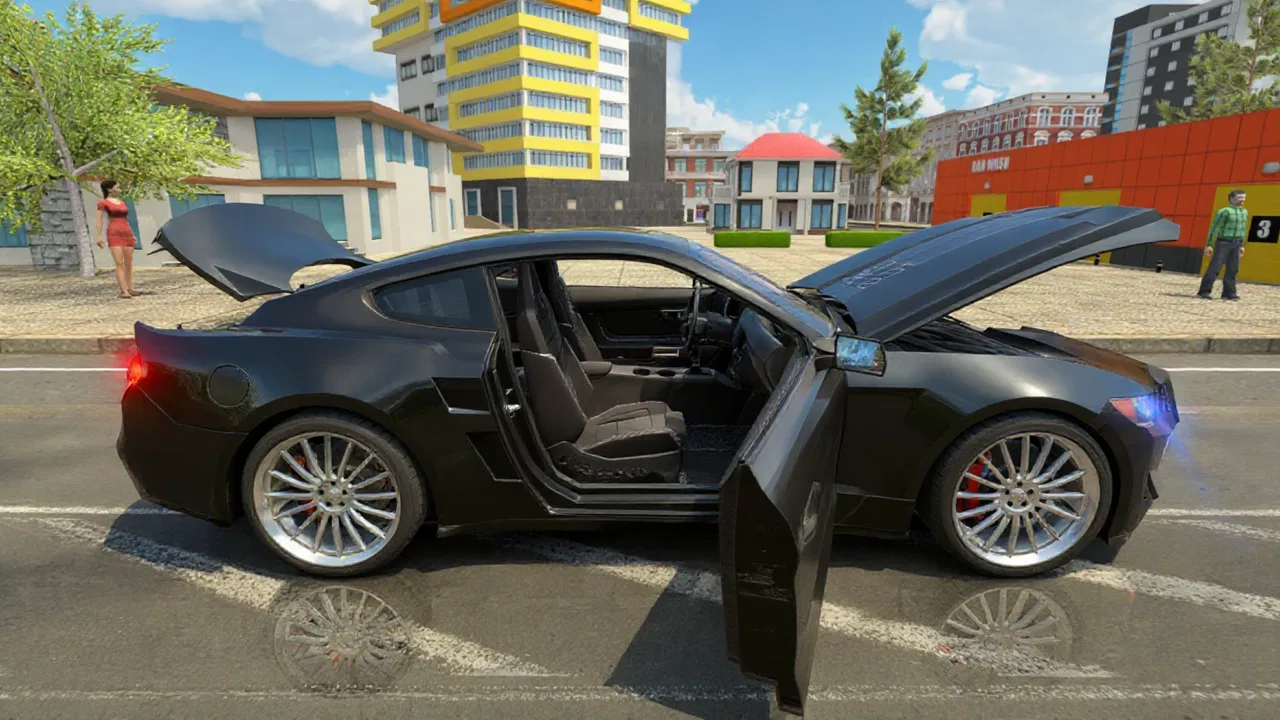
Car Simulator 2: Open World is the kind of driving game I pick up when I want more than a short race. It puts the emphasis on moving around a large city, trying different cars, improving them, and finding my own rhythm instead of pushing me through one narrow track. That freedom is its biggest attraction, but it also creates the first important question: do you want a structured racing game, or do you want a driving playground with racing mixed in?
After spending time with it, I see it as a casual-to-intermediate simulation game rather than a serious racing simulator. It is free to start, made by OppanaGames FZC LLC, and sits in the simulation category. Its store presence is substantial, with a 4.7 average from around 2 million ratings and more than 100 million installs. Those figures suggest that the open-city driving formula has found a broad audience, although popularity does not remove the need to check whether the style suits you.
Getting started without unnecessary frustration
I’d begin by treating the first drive as a chance to learn the city and the car, rather than a test you need to pass. A little patience with steering and routes makes later races feel less like guesswork, and gives you a fair sense of whether this open-world pace is your kind of driving game.
You May Also Like

 AccuWeather: Weather Radar
AccuWeather Review: A Quick, Clear Forecast for Everyday Decisions
For everyday plans, the best forecast is the one you can understand quickly. AccuWeather makes rain timing, radar, and local conditions easy to act on, with a few trade-offs.

 Hill Climb Racing
Why Hill Climb Racing Still Turns Crashes Into One More Run
A tiny car, a bumpy hill and one more upgrade: Hill Climb Racing keeps resurfacing because its simple chaos makes every near-miss feel personal.

 AliExpress - Shopping App
AliExpress Makes Global Shopping Feel Personal, but Shoppers Bear the Risk
AliExpress turns a global marketplace into a pocket-sized discovery engine. Its reach is useful, its shopping loop compelling, and its trade-offs easy to miss.

 Lords Mobile: Kingdom Wars
Lords Mobile Is a Kingdom-Building Routine, Not a Quick Match
A case-by-case verdict on the building, battles, device demands, and social commitments that make Lords Mobile rewarding for some players and exhausting for others.

 PDF Scanner app - TapScanner
TapScanner Makes Paperwork Easier to Capture, Check, and Share
TapScanner makes scanning with a phone feel less like a rescue operation and more like a dependable step in getting work done. Its capture tools are useful, though not flawless.

 Block Blast!
 Shows How Much a Puzzle Game Can Leave Out
A quiet grid game shows why puzzle players increasingly value instant clarity, repeatable skill and low-pressure play—and where the genre still needs to catch up.
More From Our News Desk
View All News


What usually causes confusion at the beginning
The first hurdle is not necessarily driving itself. In an open-world game, the player has to understand where to go, what activity deserves attention, and how car improvement fits into the wider loop. Someone expecting an immediate sequence of polished circuit races may feel that the game is less direct than alternatives built around menus and events.
I recommend treating the opening as an orientation period. Try the controls at a relaxed pace before worrying about winning everything. Learn how the city feels, notice how much room you need for turns, and test whether steering by touch or another available control method feels natural on your device. A control scheme that seems acceptable in a straight line can become awkward when traffic, corners, and quick corrections arrive together.
Another common sticking point is the difference between driving around and making useful progress. Exploring is enjoyable, but if you spend all your time wandering, you may not get a clear sense of the upgrade and racing rhythm. I found it more satisfying to alternate: take a short drive to become familiar with an area, then focus on an activity or car improvement before roaming again.
Simple setup checks before blaming the game
Car Simulator 2 runs on Android devices using version 7.0 or later. That makes it accessible to many older phones and tablets, but compatibility alone does not guarantee a smooth experience. Before starting, I would close demanding background apps, make sure the device has comfortable free storage, and avoid beginning a long session while the phone is already warm or low on battery.
These are ordinary checks, yet they matter more in a large 3D environment than in a small puzzle game. If menus take a while to respond, the image stutters, or touch input feels delayed, I first restart the game and give the device a clean session. I also avoid judging the controls during the first few seconds after loading, when a device may still be settling into the scene.
The game is free, but optional purchases range from $0.99 to $149.99 per item. I would decide on a spending limit before playing, particularly if a younger person will use the device. The content rating is Everyone 10+, which makes it suitable for a broad audience, but the presence of in-app purchases is still a practical reason to review purchase controls and expectations at home.
A useful first-session routine
My preferred setup is deliberately modest. I begin with the default car, drive slowly enough to understand the road layout, and avoid trying to buy or improve everything immediately. This tells me whether the basic handling is enjoyable before I invest time or money into the wider progression. It also makes later changes easier to judge because I have a clear memory of how the car behaved at the start.
If the game feels too busy, I reduce my goals rather than attempting to master the whole city in one sitting. One session can be for learning routes, another for racing, and another for experimenting with cars. That separation helps because open-world games can become tiring when exploration, competition, upgrades, and navigation are all treated as urgent at once.
How to recover when progress feels unclear
When I lose track of what I was doing, I return to a simple loop: choose one car, select one immediate objective, complete it, and then inspect what changed. This is more reliable than jumping between every available option. It also helps reveal whether I am stuck because I do not understand the next step or because the current car simply needs a different approach.
Car improvement deserves a similar method. Instead of changing several things at once, I prefer to make one adjustment and then drive the same kind of route again. That gives the change a practical meaning. If several upgrades are made together, it becomes difficult to tell whether the car is genuinely easier to control or merely feels different because I have become more familiar with it.
A restart can also be useful when a session becomes messy. If the game stops responding normally, the camera behaves oddly, or an activity does not seem to advance, I close and reopen it rather than repeatedly tapping through the same screen. I would not erase saved progress or alter device settings as a first response. Basic recovery should come before drastic troubleshooting.
When the problem may be outside the game
Not every poor session points to a fault in the app. A crowded device, unstable connection, aggressive battery-saving mode, or a screen covered by a thick protector can make driving feel worse. Touch controls are especially sensitive to the condition of the phone, and a player may blame the handling when the real issue is delayed input.
I also pay attention to whether the problem appears everywhere or only in one situation. If the whole device is sluggish, the game is probably sharing the problem with other apps. If only a particular activity behaves strangely, restarting the game and trying a different activity can help separate a temporary issue from a broader performance concern.
For online racing, I would be even more cautious about assigning blame. A local control problem and a connection problem feel different, but they can overlap from the player's point of view. If other online services are also struggling, changing cars or repeatedly restarting the same race is unlikely to solve the real cause. In that situation, I would return later rather than making expensive in-game decisions based on one bad session.
Why the open world is the real selling point
The city changes the pace of the experience. In a conventional racing game, the track tells me where to go and the finish line provides the purpose. Here, the pleasure comes from combining movement with choice. I can drive simply to become comfortable with a car, take a longer route, or use the city as a place to prepare for more competitive moments.
This is also why the game works well for short everyday sessions. Imagine having fifteen minutes before leaving home: I can complete a small drive, test one car change, and stop without needing to finish a long championship. On a quieter evening, I can spend more time exploring and racing. The same flexibility is less appealing if I need constant, clearly labeled objectives.
For me, the best use case is a player who likes cars but does not want every session to be a technical lesson. The game gives room to experiment without demanding that I understand real-world vehicle engineering. It is approachable enough for casual play, while the combination of driving, racing, and upgrades offers more to do than a basic free-roaming car toy.
Where it compares well with other driving games
Compared with a focused arcade racer, this game offers more freedom but less immediate intensity. A track-based alternative may feel better when I want rapid races, precise lap goals, and a clean competitive structure. Car Simulator 2 is the better fit when I want to leave the starting line without knowing exactly how the next few minutes will unfold.
Compared with a highly technical simulator, it is easier to approach but less suitable for someone seeking strict realism. The appeal is not that every detail behaves like professional motorsport. It is that driving, exploring, racing, and improving cars coexist in one accessible environment. Players who enjoy tuning every technical variable may eventually want a more specialized title, while players who find complex simulators intimidating may appreciate this middle ground.
It also differs from a simple sandbox because the cars and racing goals give the city a reason to exist. Wandering is available, but I usually enjoy it more when it supports a personal objective. That balance is important: the game is not only a map to cruise through, yet it is not constantly forcing me into a tightly scripted sequence either.
Trade-offs that are easy to miss
The first trade-off is freedom versus clarity. A large environment can make the game feel generous, but it can also make a new player wonder what matters most. My solution is to create a short-term plan instead of waiting for the game to provide perfect direction.
The second is variety versus consistency. Switching cars may keep the experience fresh, but it also means I have to relearn how each vehicle feels. If I am trying to improve at racing, frequent switching can slow that learning process. If I am playing for discovery, the same switching becomes one of the game's pleasures.
The third is free access versus spending pressure. The game can be downloaded without paying, which makes it easy to try, but the optional purchase range means I would not hand it to a child without discussing purchases first. I prefer to treat paid items as a choice rather than a requirement and judge the core driving loop before spending anything.
A fourth trade-off concerns device comfort. A long session in a detailed open city can be more demanding than a few quick races. If the phone becomes hot or the battery drops quickly, shorter sessions may be the sensible answer. That is not a reason to reject the game automatically, but it is worth considering if the device is older or already struggles with 3D titles.
Who should install it, and who should skip it
I would recommend it to someone who wants a free driving game with room to roam, enjoys trying different cars, and likes the idea of mixing relaxed exploration with races. It is especially appealing if you prefer setting your own pace and do not need every minute to be organized around a tournament or leaderboard.
I would suggest looking elsewhere if your priority is exact simulation behavior, highly disciplined competitive racing, or a completely purchase-free experience. A dedicated racing game may provide cleaner competition, while a deeper simulator may offer more control over vehicle behavior. Someone who dislikes open-world navigation may also find the freedom less exciting than a straightforward event menu.
The game is also not my first choice for a player who becomes frustrated when objectives are not immediately obvious. Its strengths require a little patience: you need to explore, test, and decide what kind of session you want. That is manageable, but it is different from games that explain every next step with maximum precision.
My practical verdict after using it
Car Simulator 2: Open World succeeds because it makes driving feel like an activity rather than a single repeated race. The city, car collection, racing, and improvement loop give me several ways to enjoy the same app, and that flexibility is more valuable than a flashy first impression.
My advice is to start slowly, check the device before playing, keep purchases under control, and use one clear objective at a time. If a session goes wrong, restart the game and check the phone before assuming the car or the city is at fault. Those small habits remove much of the friction that can make an open-world game feel confusing.
The current version is 1.62.16, and the game has been available since February 26, 2019. More importantly for a new player, it remains a sensible choice when the goal is casual city driving with enough structure to keep returning. I recommend it as a flexible car playground, not as a replacement for a serious racing simulator. That distinction sets the right expectation and makes its strengths much easier to enjoy.
FAQs for Car Simulator 2: Open World
01What are the main features of Car Simulator 2: Open World?
Car Simulator 2: Open World offers an immersive driving experience with a variety of cars to choose from. Players can explore an open world environment filled with detailed graphics and realistic physics. The game includes various missions, multiplayer modes, and customization options to enhance the driving experience.
02Is Car Simulator 2: Open World free to play?
Yes, Car Simulator 2: Open World is free to download and play on both Android and iOS platforms. However, it includes in-app purchases for additional features and customization options. Players can choose to make these purchases to enhance their gameplay experience, but it is not necessary to enjoy the core game.
03Does Car Simulator 2: Open World require an internet connection?
Car Simulator 2: Open World can be played offline, allowing users to enjoy the single-player mode without an internet connection. However, to access multiplayer features and participate in online challenges, an internet connection is required. This provides players with flexibility in how they want to enjoy the game.
04Can I customize my cars in Car Simulator 2: Open World?
Yes, customization is a key feature in Car Simulator 2: Open World. Players can modify their vehicles with various paint jobs, rims, and performance upgrades. This allows for a personalized driving experience and helps players stand out in multiplayer modes. The customization options add depth and replayability to the game.
05What are the system requirements for Car Simulator 2: Open World?
Car Simulator 2: Open World is designed to run on most modern smartphones. For Android users, it typically requires Android version 5.0 or higher, while iOS users need iOS 10.0 or later. It's recommended to have a device with at least 2GB of RAM to ensure smooth gameplay and an optimal experience.
Pros
- Realistic driving physics enhance gameplay.
- Extensive car customization options.
- Large open world with diverse locations.
- Multiplayer mode adds social interaction.
- Frequent updates with new features.
Cons
- Graphics may seem outdated for some users.
- In-app purchases can be expensive.
- Occasional bugs interrupt gameplay.
- Requires a stable internet connection.
- Limited tutorial for beginners.

Car Simulator 2: Open World
Gallery